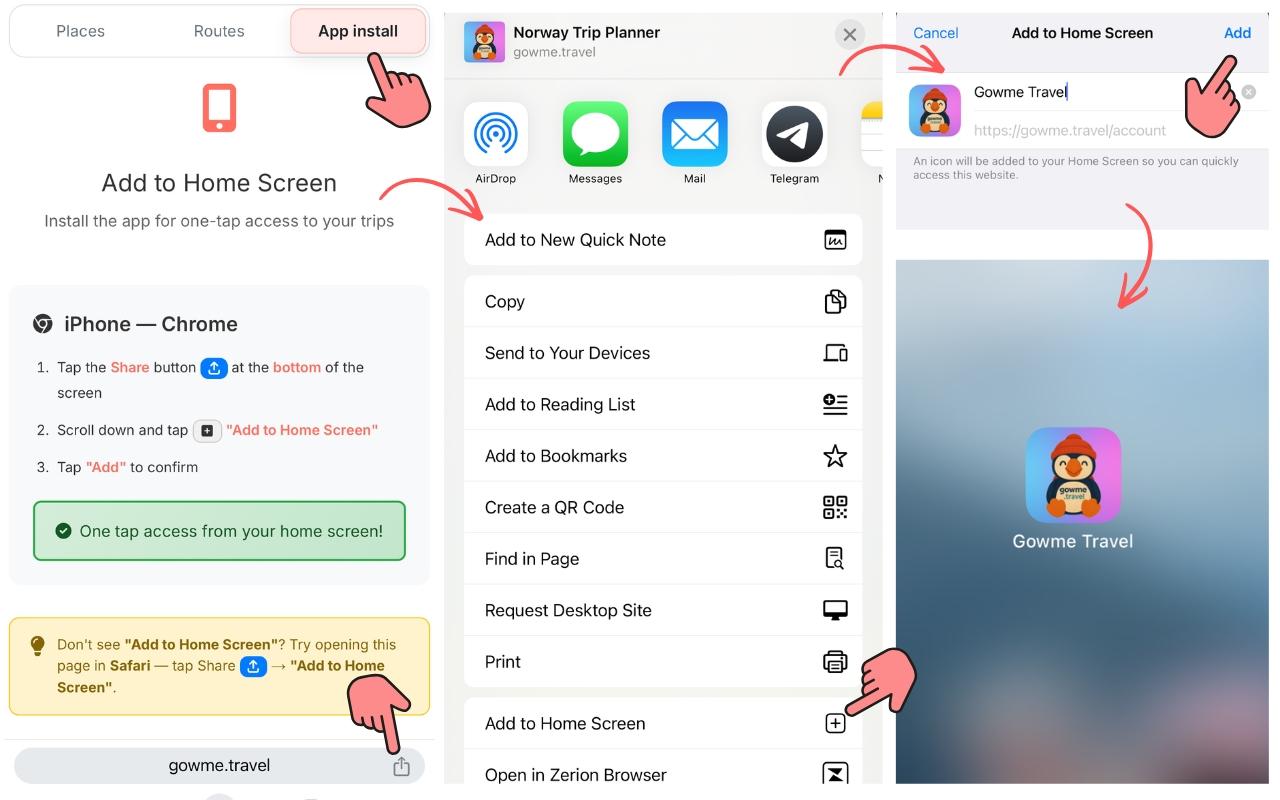
Install the Norway travel app in 10 seconds
The Gowme Norway travel app installs from your browser — tap App Install when the prompt appears, or use your browser's "Add to Home Screen" option. The app icon appears on your home screen immediately. No app store, no waiting, no permissions to approve.
It opens full screen — no browser address bar or tab bar taking up space. On a phone, that's a noticeably bigger planning area. On a tablet, it's a proper full-screen experience.
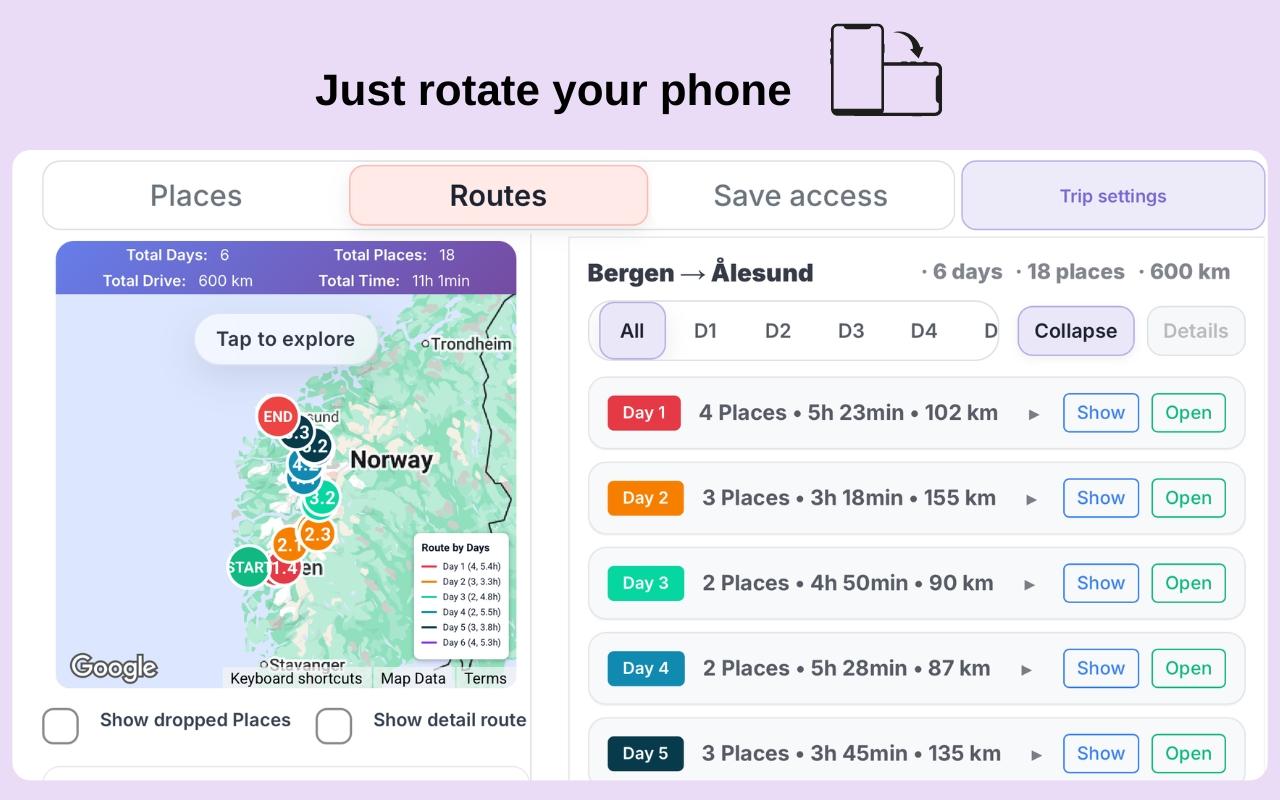
Road trip planning mode — map and itinerary side by side
Rotate your phone sideways and the layout adapts: the map fills one side, the day list the other. This is how the route planner is actually designed to be used on mobile — you can see the map and the itinerary at the same time, without switching between them. Useful for planning on the road when you want to check where tomorrow's stops are.
Works offline — even in the fjords
Once your itinerary is generated, it saves to your device automatically. If you're driving through a fjord valley with no signal — or hiking somewhere that doesn't have coverage — your full itinerary is still there: all days, all locations, all the detail panels. No loading required.
Gowme generates your route online, but the trip itself is available wherever you are. Norway has plenty of areas where signals are unreliable. Your itinerary isn't one of them. Note: offline map tiles are not available — Google does not allow caching map data — so the interactive map requires a connection. Your route, locations, and detail panels do not.
Picks up where you left off
Everything you build in Gowme — your preferences, your route, places you liked or excluded — is saved locally. All the locations matched to your interests and the full itinerary built in seconds are stored in the app. Close it, open it the next day, and you're back where you left off. No account required for this. Nothing to log in to.
Frequently asked questions
- Does it work on iPhone and Android?
- Yes — both. On iPhone, use Safari and tap "Add to Home Screen" from the share sheet. On Android, use Chrome and tap "Add to Home Screen" from the browser menu. The result is a full-screen app icon either way.
- Why isn't it in the App Store or Google Play?
- Installing directly from the browser is faster and works on any device without app store approval delays. You get updates automatically — there's nothing to manually upgrade.
- Does it really work offline?
- Your generated itinerary and all cached place data is stored locally on your device. You can view your route, all day plans, and location details without a connection. The interactive map requires internet — Google does not allow caching map tiles offline. Live navigation also requires a connection, but your trip data does not.
- What if I change devices or clear my browser?
- Your trip data is stored on the device. If you switch devices or clear storage, you'd need to regenerate your route. We recommend keeping the itinerary open in the app on your travel device and not clearing storage during your trip.
- Is horizontal mode automatic?
- Yes — rotate your phone to landscape and the layout switches automatically. You don't need to enable anything. If it doesn't rotate, check that your phone's rotation lock is off.
- Can I use it on a tablet?
- Yes — the layout works well on iPad and Android tablets, especially in landscape mode. The map and itinerary layout is comfortable at tablet size.
- Does the app send notifications?
- Not currently. Notifications are not enabled. The app opens to your last state when you tap the home screen icon.
More features of the Gowme planner: Route planner → · Google Maps export →